
Every vehicle page we sampled had structured data. That’s a good starting point, but it doesn’t tell us whether the information is complete or correct.
We checked 2,430 pages across 486 dealership websites. All 1,458 vehicle detail pages included a structured vehicle record, but mileage was missing from that record on about a third of the used-vehicle pages we could evaluate. We also found examples where a field was filled in and disagreed with what shoppers saw.
One vehicle advertised as new showed 4,384 miles on the page and zero miles in its structured data. We captured it again and got the same result.
That’s the kind of issue this study was designed to find. Having the code is useful. We also need to check what it says.
What structured data does for your inventory
Structured data, sometimes called schema or markup, labels information in your website’s code so software can identify it. It can tell a tool which number is the price, which number is the mileage, and which VIN those facts belong to.
A shopper can usually distinguish a selling price from a monthly payment by looking at the page. Software needs enough context to make that distinction too.
Say someone asks an agent to find a used SUV under $30,000 with fewer than 50,000 miles. The agent needs the condition, price and mileage for the same vehicle. If mileage is missing from the structured record, that record alone can’t confirm whether the vehicle qualifies. If a monthly payment is labeled as the purchase price, the agent could make the wrong comparison.
It may find the correct information elsewhere on the page. But the structured record should help answer the question accurately.
We didn’t test whether any particular AI service recommended these vehicles or generated leads. We checked the information available on the website.
What we found
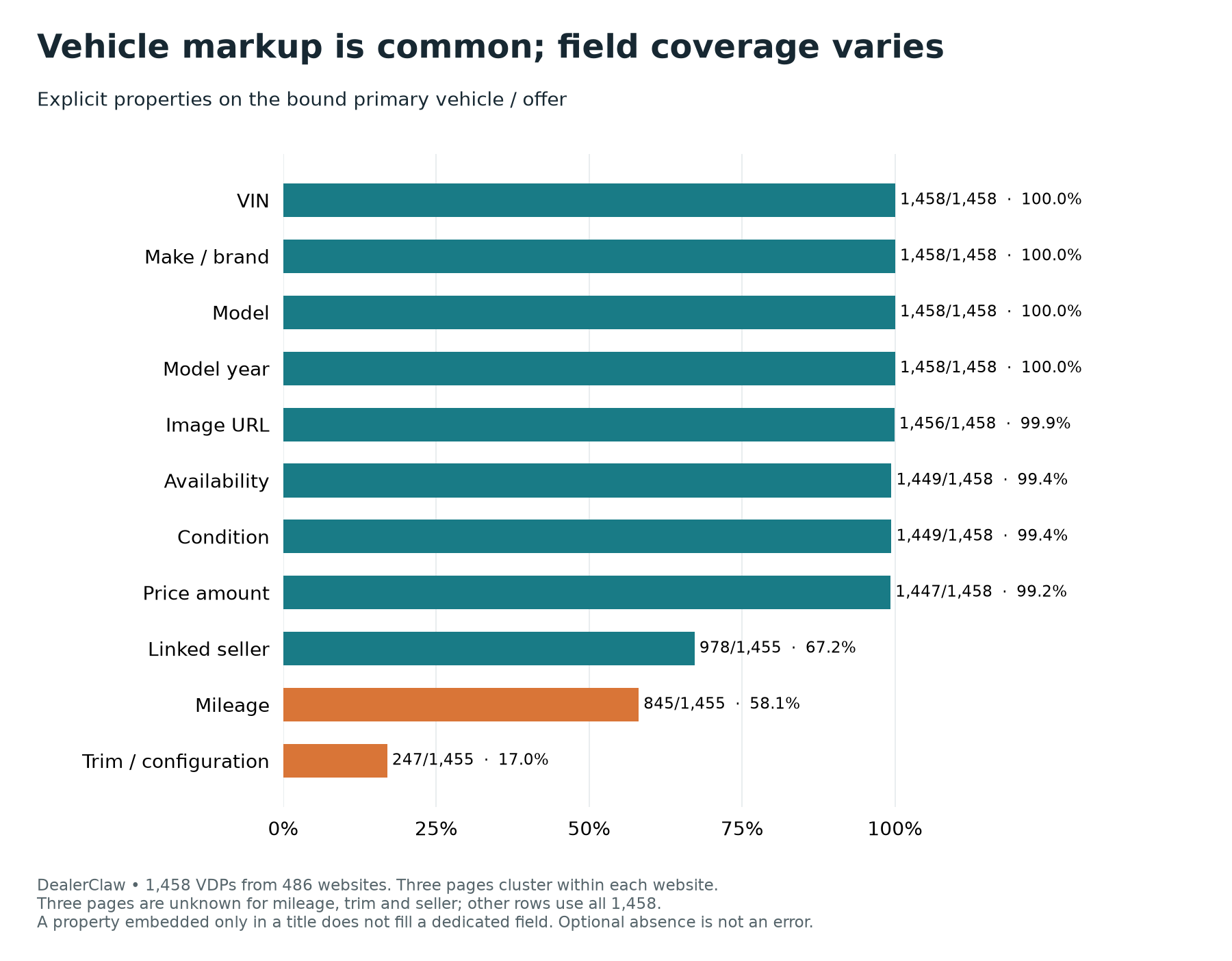
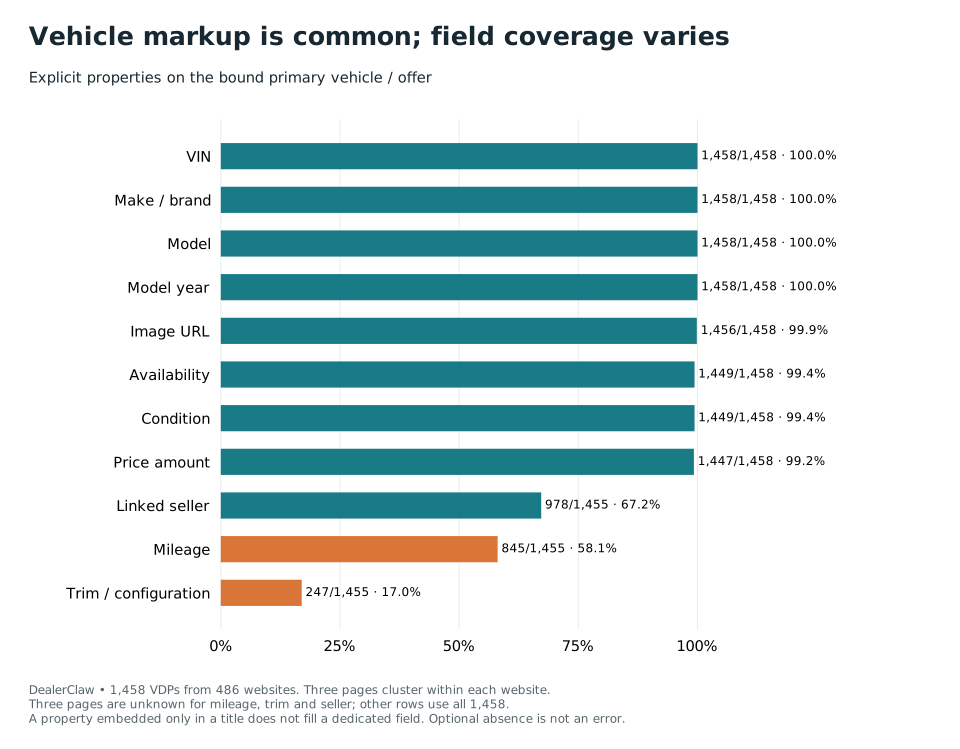
The basic vehicle details were widely available. VIN, make, model and model year appeared in the structured data on every sampled vehicle page. Price, images, condition and availability were also common.
Other fields were less consistent.
| Field | Pages with the field / evaluable pages | Share |
|---|---|---|
| VIN, make, model and model year, each | 1,458 / 1,458 | 100.0% |
| Image URL | 1,456 / 1,458 | 99.9% |
| Currency | 1,450 / 1,458 | 99.5% |
| Condition and availability, each | 1,449 / 1,458 | 99.4% |
| Price amount | 1,447 / 1,458 | 99.2% |
| Linked seller | 978 / 1,455 | 67.2% |
| Mileage and mileage units, each | 845 / 1,455 | 58.1% |
| Dedicated trim or configuration field | 247 / 1,455 | 17.0% |
These numbers show whether the fields were present. They don’t certify that every value was correct.
We checked the vehicle being advertised, so a VIN or mileage reading from a recommended vehicle elsewhere on the page didn’t count. A separate check found a structured vehicle record matching the primary VIN on all 1,458 detail pages.
For trim, we counted a dedicated field. A trim mentioned only in the title didn’t qualify. For seller, we required a connection to the vehicle or offer, rather than a dealership name somewhere else on the page. Three pages remained unknown for seller, mileage, units and trim.
Those distinctions matter when someone tells you a field is “missing.” The information may be visible to shoppers while still being absent from the record a tool is reading.
New vehicles didn’t explain the whole mileage gap
Most of the sampled vehicle pages were for new inventory, so we separated the mileage results by listed condition.
| Listed condition | Mileage markup present | Mileage markup missing | Unknown |
|---|---|---|---|
| New | 509 / 954 (53.4%) | 445 / 954 (46.6%) | 2 |
| Used, including certified pre-owned | 336 / 501 (67.1%) | 165 / 501 (32.9%) | 1 |
New inventory accounted for much of the overall gap, but 165 used-vehicle pages also lacked mileage markup.
On one reviewed used-vehicle page, shoppers could see 41,639 miles. The structured vehicle record omitted mileage entirely. An agent relying on that record would need another source before answering a mileage question.
New inventory deserves a check too. The vehicle showing 4,384 miles on the page and zero in its code is a useful example. “New” describes the listed condition; it doesn’t establish an odometer reading.
We verified that the two representations disagreed. We didn’t inspect the vehicle or establish its actual mileage.
My recommendation is to use the actual known reading and its unit in both places. If the reading is unknown, leave it unknown. Zero is a specific value.
Some homepage information appeared only after JavaScript ran
A website first sends HTML to the browser. JavaScript can then add or update information as the page loads.
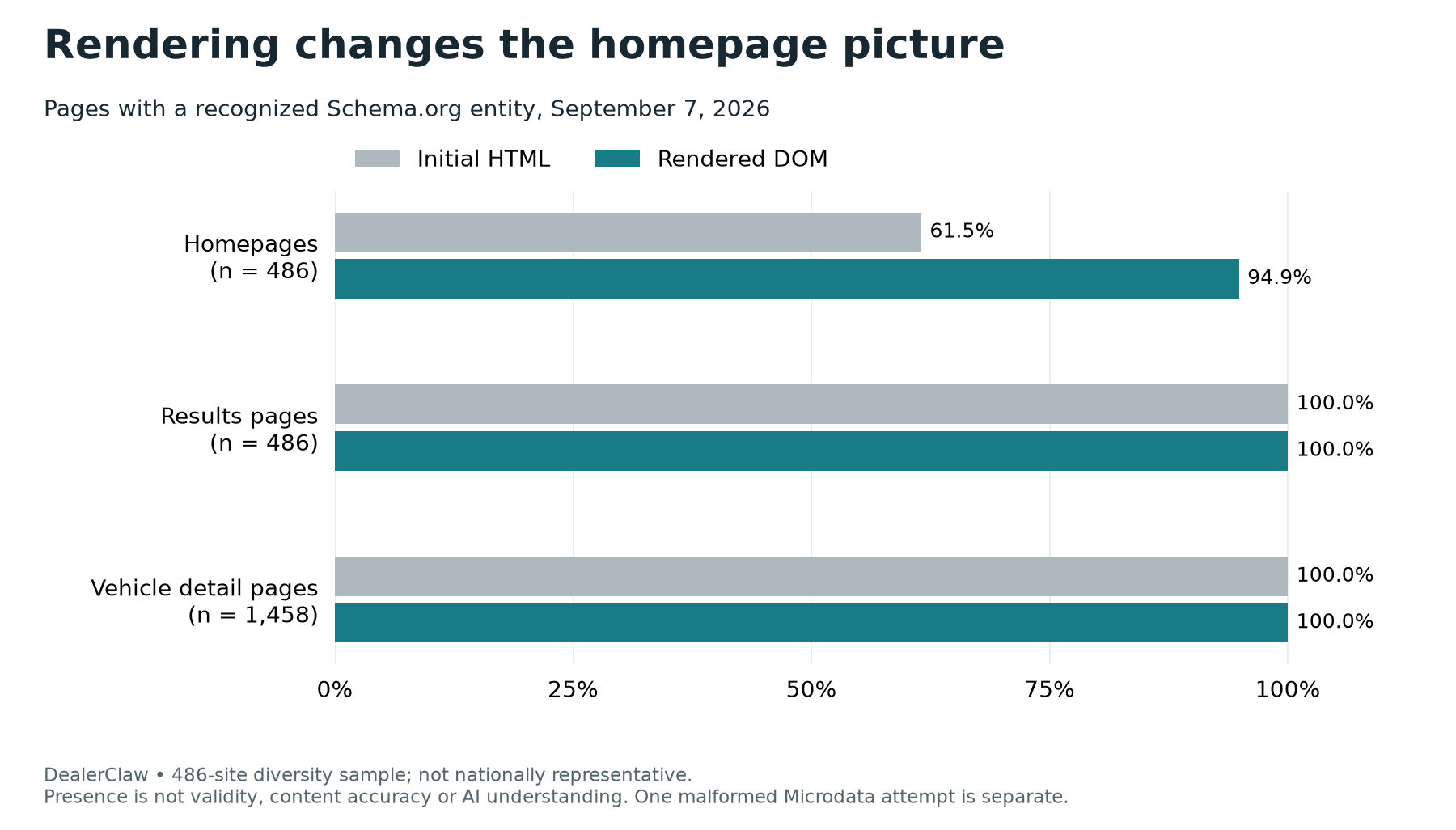
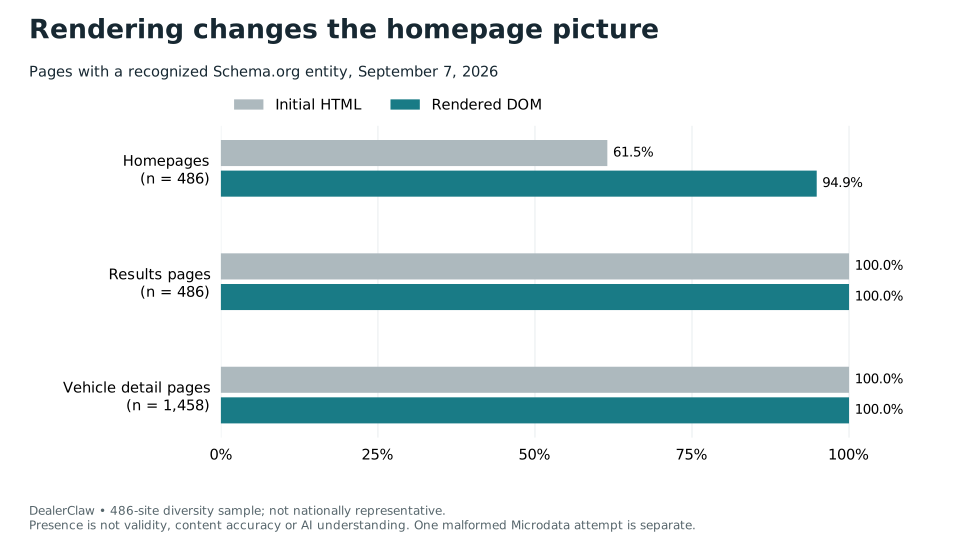
We checked both versions. Recognized schema appeared on 299 of 486 homepages in the initial HTML, increasing to 461 after the browser ran the page. On 162 homepages, the recognized schema appeared only at that later stage.
That means a tool reading just the initial response would miss those structured records. It might still find the dealership’s information elsewhere, but it wouldn’t receive the same labeled information we found in the completed browser view.
The remaining 25 homepages included 24 without recognized schema and one with an incorrectly formed type declaration. Every selected inventory results page and vehicle detail page had recognized Schema.org entities in both states.
This doesn’t establish that those dealerships lost rankings or were invisible to AI. We didn’t test individual commercial crawlers. It does give you a specific question for your provider: which important facts arrive in the initial response, and which depend on JavaScript?
Inventory pages used different approaches
A page listing vehicles can describe each vehicle directly or provide a structured list of links to individual vehicle pages. We saw both.
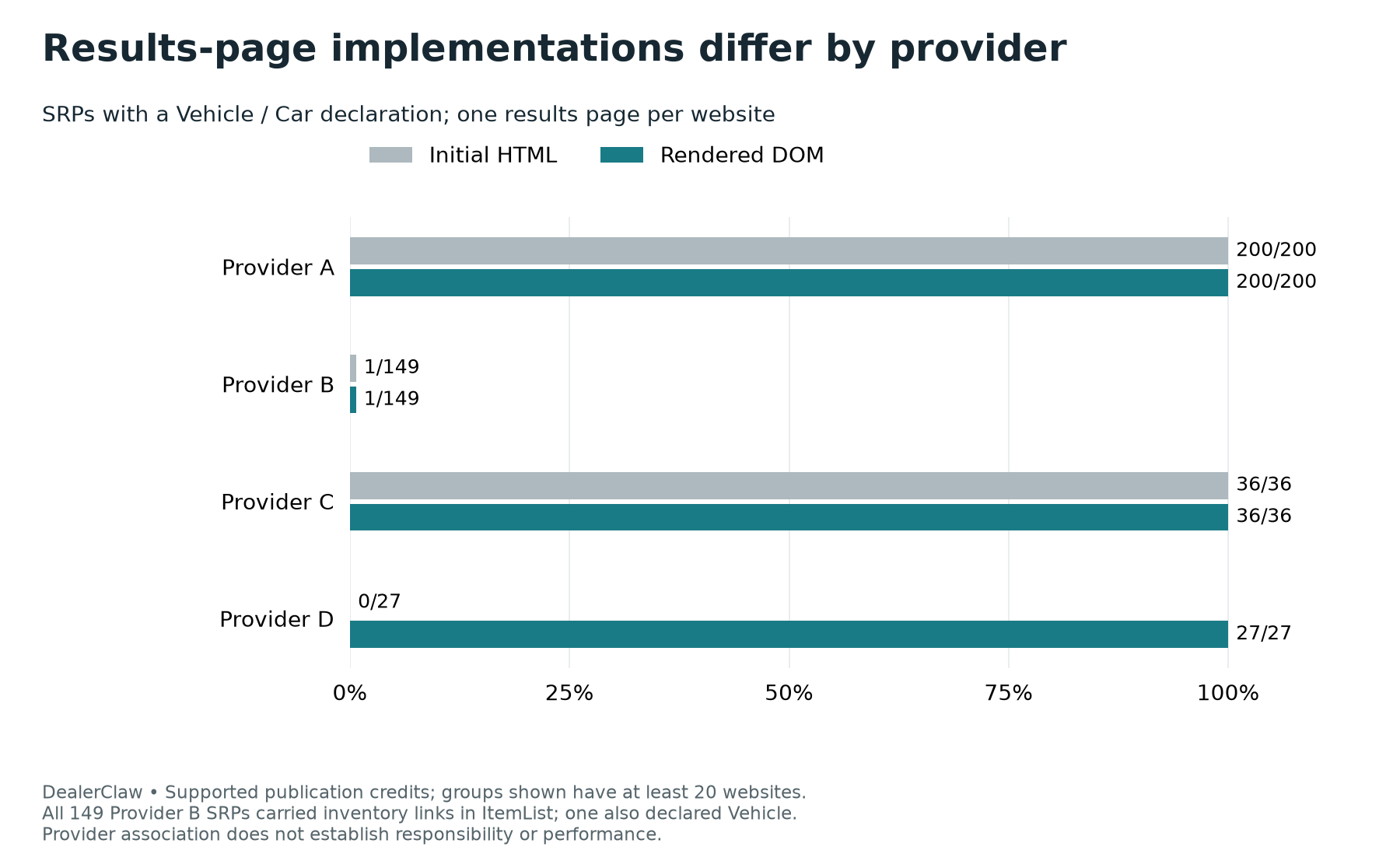
Across the four provider groups large enough for comparison, all sampled vehicle detail pages had Vehicle or Car markup. The inventory results pages varied:
| Provider group | Websites | Results pages with Vehicle/Car markup initially | After rendering |
|---|---|---|---|
| A | 200 | 200 | 200 |
| B | 149 | 1 | 1 |
| C | 36 | 36 | 36 |
| D | 27 | 0 | 27 |
All 149 Provider B results pages supplied inventory links through an ItemList. The one page with Car declarations described model families rather than individual stock vehicles.
I wouldn’t use the Vehicle/Car count by itself to decide whether those pages provided useful inventory information. A link to the correct vehicle page can still give an agent a way to find the details. A general model description doesn’t establish that a particular vehicle is in stock.
Provider D’s vehicle declarations appeared after rendering on all 27 sampled results pages. These are implementation patterns in our sample, not a ranking of providers or proof of who was responsible for a particular configuration. We withheld provider names, and 67 websites remained unattributed by our recognizer.
Check whether the inventory list covers what’s on the page
On one fully reviewed results page, we found 15 displayed vehicle cards and 12 structured detail-page links. Those links matched the first 12 cards, leaving three displayed vehicles outside that structured list.
Some cards had sold graphics, so we didn’t treat all 15 as available inventory. We also didn’t compare the list with a larger site-wide inventory count.
An agent starting with only those 12 links would have three fewer vehicles to inspect than a shopper saw on the page. Another tool might find them through ordinary links.
Our automated card detection worked differently across layouts, so this is an inspected example. It isn’t an inventory-accuracy rate for the full sample.
Understand the price before calling a difference an error
Vehicle pages can show MSRP, selling price, conditional rebates, finance payments and lease payments. Fees can also explain why two amounts differ.
One reviewed listing had a structured price of $35,125 and a visible price of $35,624. The offer description explained the $499 difference: one amount included the fee and the other excluded it.
Another pair, $60,730 and $61,530, reflected MSRP and a price including an $800 processing fee. We didn’t count either example as a confirmed price error.
Other differences stayed unresolved because we couldn’t confidently establish the price basis or qualifications.
This is where an automated check needs some restraint. It should preserve the amount, its label and its conditions. A numerical difference is a reason to investigate, but it isn’t enough to tell a provider the price is wrong.
Readable code can still contain the wrong information
Our technical checks confirmed JSON-LD errors on four websites, affecting eight selected pages and 11 occurrences across the initial and rendered captures. Other readable records on those pages still counted as present.
We also found a separate homepage type declaration using //schema.org/AutoDealer where a full type address was required.
These were specific technical findings, not a complete certification of every page. Multiple blocks, multiple offers and optional missing fields weren’t automatically treated as errors.
There are two checks here: can a tool read the record, and does the record accurately describe the listing? Both need attention.
What I’d ask your website provider to check
Start with a small sample that includes the homepage, new and used inventory results, and several individual vehicles.
Ask the reviewer to:
- Compare the initial HTML with the completed browser page.
- Match each structured vehicle record to the primary VIN.
- Compare price, mileage, condition, availability, trim, images and seller with the visible listing.
- Separate missing fields from conflicting values and anything that remains unknown.
- Match structured inventory links to displayed vehicles, accounting for pagination and sold cards.
Once a problem is verified, the request to your provider should include the URL, VIN where relevant, both observed values, the check time and how you’ll confirm the fix.
That gives everyone something specific to work through. “Improve our AI readiness” is much harder to act on than “this VIN shows 4,384 miles on the page and zero in the structured record.”
How to read these results
We completed five pages per website across 486 websites in 39 states. The target was 500. We attempted 817 candidates and included only websites that supplied five usable pages and passed the inclusion checks.
The incomplete attempts included 248 unavailable homepages, 39 cases where inventory discovery couldn’t be completed, 37 without enough distinct vehicle-page candidates, and seven captured sites excluded or left unusable after review. Collection ended after the final replacement queue, with additional candidates still unattempted.
We tested the process on 20 websites before fixing the main selection rules. Regional, state, dealer-group, manufacturer-family and provider limits reduced concentration, and a fixed rule selected vehicles. The completed regional counts were 125 Midwest, 125 Northeast, 124 South and 112 West.
This was not a nationally representative sample. The pages also share dealership, group and provider dependencies, so we don’t report national confidence intervals.
Direct AI-assisted review covered 132 pages from 44 websites, 95 selected field records and 70 rendering-category checks on 41 final pages, along with targeted follow-ups. Separate code paths supported recounts. That wasn’t an independent human review panel or manual certification of every field, and automated agreement labels remain candidates.
The study builds on earlier dealership research by checking multiple page types, initial and rendered code, field meanings and selected visible values. We didn’t reproduce another study’s proprietary readiness score, and percentages from different samples or tests shouldn’t be treated as directly comparable.
We also didn’t measure AI recommendations, citations, rankings, traffic or sales. The findings support specific website checks, not promises about those outcomes.
DealerClaw publishes this research and provides managed AI-agent services to automotive businesses. Public downloads contain methodology and summary results. Identified pages, VINs and captures remain private, so the downloads allow readers to check reported calculations rather than independently re-create every page-level finding.
Sources and supporting material
- Google's explanation
- Study data
- new/used mileage breakdown
- Methodology
- sampling log
- Schema.org Car
- Field definitions
- field-level results
- Open full-size chart
- Business field definitions
- Schema.org data model
- Anonymous example and review
- Google's accuracy guidance
- Breakdown and methodology
- Schema.org's definition
- Schema presence by page type
- Open full-size chart
- Google's JavaScript explanation
- structured-data support
- Provider chart data
- model-catalog review
- Open full-size chart
- Anonymous card-to-link summary
- Price review
- Technical audit
- WHATWG Microdata standard
- Savvy Dealer study
- Research review
- Alrashed and colleagues
- Google's retirement announcement
- Google AI-feature documentation
- AI-access study of 500 dealership websites
- vendor follow-up example